Java Specification, API, JDK, JRE and IDE
Understanding the Java ecosystem: language specification, API, development kit, runtime environment, and integrated development environment.
Introduction
- The syntax of the Java language is defined in the Java Language Specification, and the Java library is defined in the Java Application Programming Interface (API).
- JDK is the software for compiling and running Java programs.
- IDE is an integrated development environment for rapid program creation.
Computer languages have strict rules of usage. If you do not follow these rules when writing a program, the computer will not understand it. The standards of the Java language are defined by the Java Language Specification and the Java API.
Java Language Specification
The Java Language Specification is a technical definition of the syntax and semantics of the Java programming language. The complete Java Language Specification can be found at:
Java API
The Java Application Programming Interface (API), also known as the library, contains predefined classes and interfaces for developing Java programs. The Java API is constantly expanding. You can view the latest version of the Java API documentation at:
Java Editions
Java is a full-fledged and powerful language that can be used in different ways. It is released in three editions:
- Java Standard Edition (Java SE) – for developing client-side applications. These applications can run on a desktop computer.
- Java Enterprise Edition (Java EE) – for developing server-side applications, such as Java servlets, JavaServer Pages (JSP), and JavaServer Faces (JSF).
- Java Micro Edition (Java ME) – for developing applications for mobile devices, such as cell phones.
Creating, Compiling, and Executing a Java Program
- A Java program is saved in a
.javafile and compiled into a.classfile. - The
.classfile is executed by the Java Virtual Machine (JVM).
Before executing a program, you must create and compile it. This process is shown in the following figure. If the program has compilation errors, you must modify it to fix them and then recompile the program. If the program has runtime errors or produces incorrect results, you must modify it, recompile it, and run it again.
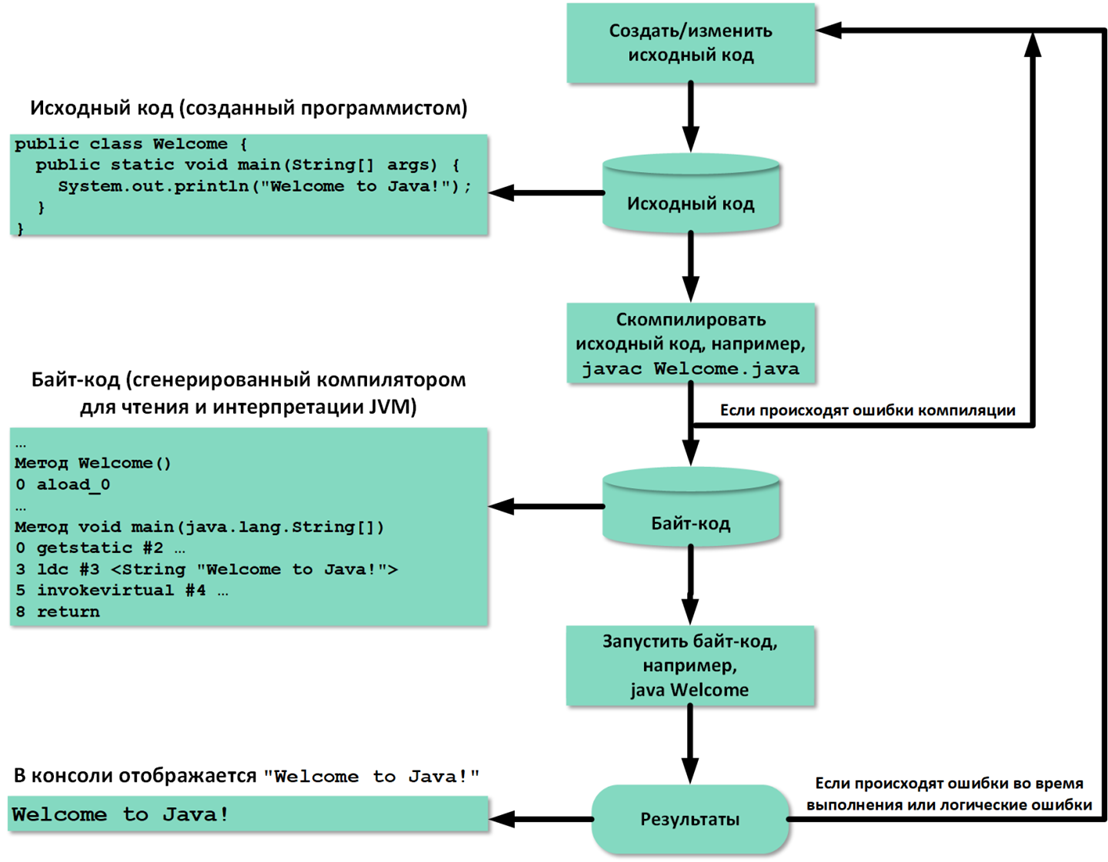 Figure: The process of creating, compiling, and executing a Java program
To create and edit a Java source code file, you can use any text editor or IDE. This section shows how to create Java programs in Notepad, and compile and run them in the Command Prompt. The next section describes developing Java programs using the IntelliJ IDEA environment.
Download JDK: Any version of the JDK, including the latest one, as well as instructions for its setup, can be downloaded from:
If there are no syntax errors in the program, the compiler generates a bytecode file with a .class extension. Thus, the command javac Welcome.java generates the file Welcome.class, as shown in the following figure.
 Figure: Compilation generates a .class file
Java is a high-level language, while Java bytecode is a low-level language. Bytecode is similar to machine language instructions but is architecture‑neutral and can run on any platform that has a Java Virtual Machine (JVM), as shown in the figure on the right.
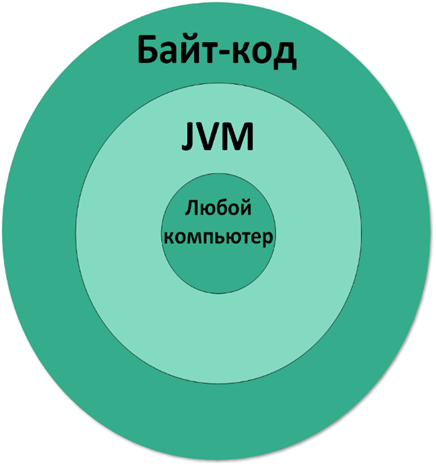
Figure: Bytecode runs on any platform with a JVM
Unlike a physical machine, a virtual machine is a program that interprets Java bytecode. This is one of Java's main advantages: Java bytecode can run on various hardware platforms and operating systems. Java source code is compiled into Java bytecode, and the JVM interprets it. Your Java code can use the Java library, so the JVM executes your code together with code from the library.
To execute a Java program, you need to run its bytecode. Bytecode can be executed on any platform with a Java Virtual Machine (JVM), which is an interpreter. It translates bytecode into the target machine language not all at once, but one instruction at a time. Each step is executed immediately after being translated into machine language.
The following command runs the bytecode for the Welcome program:
java Welcome
The following figure shows the javac command to compile Welcome.java. The compiler creates the file Welcome.class, which is executed with the java command.
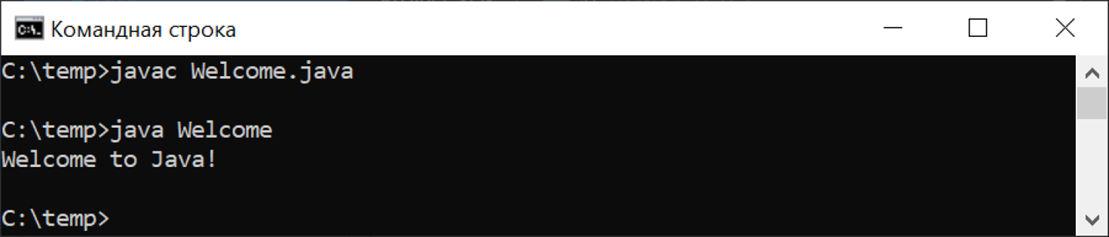 Figure: Compilation and execution commands
Important Notes
Note: When executing a Java program, the JVM first loads the bytecode of the class into memory using a program called the class loader. If the program uses other classes, the class loader dynamically loads them just before they are needed. After the class is loaded, the JVM uses a program called the bytecode verifier to check the validity of the bytecode and ensure that the bytecode does not violate Java security constraints. To prevent Java class files from being tampered with and causing harm to the computer, Java provides a high level of security.
Note: Starting with JDK 11, you can compile and run a single‑file source‑code program using java ClassName.java. This command combines compilation and execution into one step. A single‑file source‑code program is a program that contains only one class in its file. An example of such a program is any program from the previous course "Fundamentals of Java Programming".
Hint: If you try to run a non‑existent class file, a NoClassDefFoundError will occur. If you run a class file that does not have a main method, or if you mistype the method name (e.g., Main instead of main), a NoSuchMethodError will occur.
Summary of Key Components
| Component | Description |
|---|---|
| Java Language Specification | Technical definition of Java syntax and semantics |
| Java API | Predefined classes and interfaces for Java development |
| JDK (Java Development Kit) | Software for compiling and running Java programs |
| JRE (Java Runtime Environment) | Provides libraries and JVM to run Java programs |
| JVM (Java Virtual Machine) | Executes Java bytecode on any platform |
| IDE (Integrated Development Environment) | Tool for rapid program creation (e.g., IntelliJ IDEA, Eclipse) |