Lesson 3: Java Conditional Statements and Decision Structures
Understanding boolean operators and conditional statements in Java
Decision Structures
Decision structures allow a program to execute different sections of code depending on the state of data in the application.
Java provides two main conditional statements: if statement (primary) and switch statement (alternative).
IF Statement
The if statement is a selection structure that allows a program to describe alternative paths of execution.
Simple IF Statement (One-way)
Executes an action only when the condition is true.
Syntax of simple IF statement:
if (boolean-expression) {
    statement(s);
}
Example:
if (radius >= 0) {
    area = PI * radius * radius;
    System.out.println("Area of circle with radius " +
        radius + " is " + area + ".");
}
Important Notes:
- ▶ The boolean expression must be enclosed in parentheses.
- ▶ Curly braces can be omitted if the block contains only one statement.
SimpleIfDemo Program: Checks if number is divisible by 5 or even.
import java.util.Scanner;

public class SimpleIfDemo {
    public static void main(String[] args) {
        int number;
        Scanner input = new Scanner(System.in);

        // Get integer
        System.out.print("Enter an integer: ");
        number = input.nextInt();

        // Check divisibility and display result
        if (number % 5 == 0)
            System.out.println("Divisible by 5");

        if (number % 2 == 0)
            System.out.println("Even");
    }
}
IF-ELSE Statement (Two-way)
Executes one block of code if condition is true, another block if condition is false.
Syntax of IF-ELSE statement:
if (boolean-expression) {
    statement(s)-for-true-case;
} else {
    statement(s)-for-false-case;
}
Example (checking even/odd):
if (number % 2 == 0)
    System.out.println(number + " is even.");
else
    System.out.println(number + " is odd.");
ELSE-IF Statement (Multi-way)
Tests multiple conditions in sequence.
Syntax of ELSE-IF statement:
if (score >= 90)
    System.out.print("A");
else if (score >= 80)
    System.out.print("B");
else if (score >= 70)
    System.out.print("C");
else if (score >= 60)
    System.out.print("D");
else
    System.out.print("F");
Example with ELSE-IF checking Strings comparison:
import java.util.Scanner;

public class L3ifLab1 {
    public static void main(String[] args) {
        Scanner scanner = new Scanner(System.in);
        String answer = scanner.next();

        if (answer.equals("yes")) {
            System.out.print("yes");
        }
        else if (answer.equals("I_don't_know")) {
            System.out.print("I_don't_know");
        }
        else {
            System.out.print("else clause");
        }
    }
}
Laboratory Works and Tasks
Lab 1: Checking the Parity of a Number
Objective: Request user to input an integer. Check to see if the number is even. Output the result.
[File name and class name: L3Lab1.java]
Expected Output:
Please enter an integer value and press Enter
5
The result: The entered number was not an even number
+++
Please enter an integer value and press Enter
6
The result: The entered number was an even number
Algorithm:
1.Open Visual Studio Code.2.Within the folder 'java' create a new file named
L3Lab1.java.3.In the very first line import the Scanner package:

4.Add the code of a class name (must be the same as the file name) and a main function (method) code:
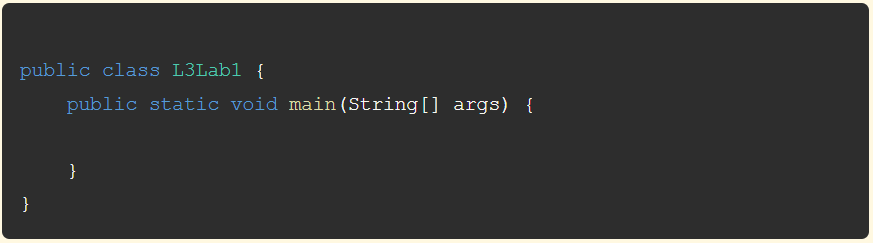
5.Place your cursor immediately after the open curly brace in the main method, then press enter to create a new line.
6.Request user to input with
println() method:
7.Create Scanner object:

8.Assign the entered value to the variable
numb:
9.Check to see if the number is even. If it is, output the phrase "The entered number was an even number":

10.Important: Checking to see if a number is even:
- ▶ It is possible to check a remainder when dividing the number by 2.
- ▶ The (%) or modulus operator returns the remainder of integer division.
- ▶ If the remainder is 0, then the value is able to be divided by 2 with no remainder, which means it is an even number.
numb is not even (odd). In this case, output the phrase "The entered number was not an even number":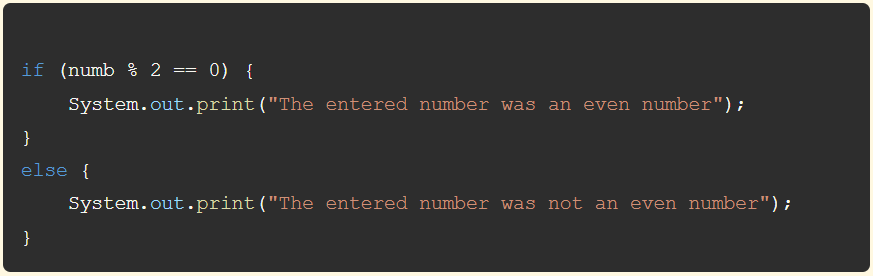
12.Close th scanner and press the F5 key or menu Run → Start Debugging (or use terminal window and special commands).
13.This will cause Visual Studio Code to compile the code and run the application. A console window will open asking you to enter an integer value.
14.Don't forget to place the text of the task as a comment before the program:
/*
Request user to input an integer.
Check to see if the number is even.
Output the result (a phrase "The entered number was an even number" or
    "The entered number was not an even number")
*/L3Lab1.java file.How to Run Java files in terminal (even if there is no java extension) :
- Save the file (filename.java).
- Compile:
bash (terminal):
javac filename.java
- Run:
bash (terminal):
java filename
Lab 2: Body Mass Index (BMI) Calculator
Objective: Write a program that gets weight in kilograms and height in centimeters from user, then displays and interprets BMI (Body Mass Index) using nested if statements.
Note: formula to calculate BMI: bmi = weight / (height_in_meters * height_in_meters):
[File name and class name: L3Lab2.java]
BMI Interpretation Table:
| BMI | Interpretation |
|---|---|
| BMI < 18.5 | Underweight |
| 18.5 ≤ BMI < 25.0 | Normal |
| 25.0 ≤ BMI < 30.0 | Overweight |
| 30.0 ≤ BMI | Obese |
Expected Output:
Enter the weight in kilograms:
75
Enter the height in centimeters:
185
bmi = 21.913806
standard
Algorithm:
1.Open Visual Studio Code and create a new file namedL3Lab2.java.2.Import the Scanner package in the first line:

3.Define the class and main method:
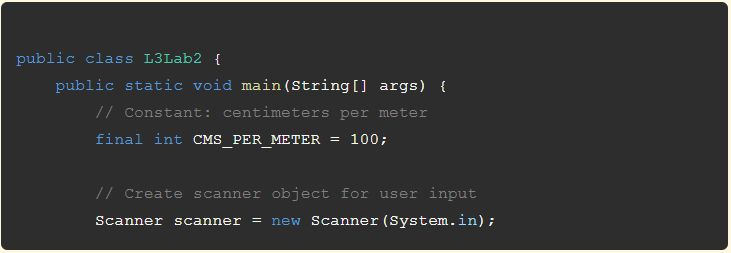
4.Get weight in kilograms from user:

5.Get height in centimeters from user:

6.Calculate BMI using the formula:
bmi = weight / (height_in_meters * height_in_meters):
7.Display the calculated BMI:
System.out.printf("bmi = %.6f \n", bmi);8.Interpret BMI using nested if statements according to the interpretation table:
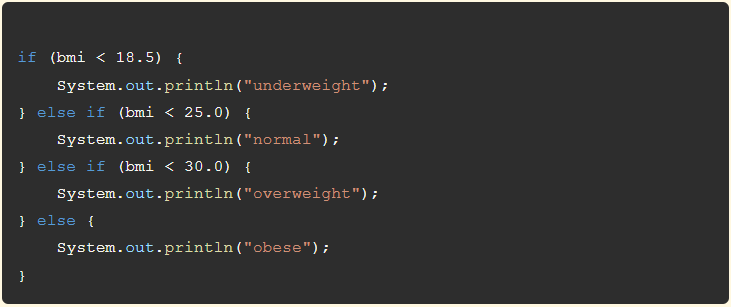
9.Close the Scanner object to free resources:

10.Add the task description as a comment at the beginning of the program.
11.Run the program by pressing F5 or selecting Run → Start Debugging (or use terminal window and special commands).
12.Test the program with different weight and height values to verify correct BMI calculation and interpretation.
How to Run Java files (even if there is no java extension) :
- Save the file (filename.java).
- Compile:
bash (terminal):
javac filename.java
- Run:
bash (terminal):
java filename
Task 1: Check Positive or Negative Number
Objective: Request user to input an integer. Check to see if the number is positive or negative. Output the result.
[File name and class name: L3Task1.java]
Expected Output:
Please enter an integer value and press Enter
50
The result: The entered number was positive
+++
Please enter an integer value and press Enter
-7
The result: The entered number was negative
Task 2: Extract Digits from Two-Digit Number
Objective: A two-digit integer is given. Output its right and left digits (use operations %, / to get the digits).
[File name and class name: L3Task2.java]
Expected Output:
Please enter a two-digit number:
50
The result: right digit is 0, left digit is 5
---
Please enter a two-digit number:
-76
The result: right digit is 6, left digit is 7
Task 3: Set Middle Digit to Zero in Three-Digit Number
Objective: A three-digit number is given. Set its middle digit to a value of 0.
[File name and class name: L3Task3.java]
Expected Output:
Please enter a three-digit number:
523
The digits: 5,2,3; the resulting number: 503
Task 4: Check if Any Two Numbers are Not Equal
Objective: Three integers are given. Output true if any two of them are not equal, and false otherwise.
[File name and class name: L3Task4.java]
Expected Output:
Please enter three numbers:
13, -4, 6
The result: true
+++
Please enter three numbers:
6, -4, 6
The result: false
+++
Please enter three numbers:
13, 13, 6
The result: false
Task 5: Check Triangle Existence and Calculate Area
Objective: Integers a, b and c are given. Print true if a triangle with matching side lengths can exist, print false otherwise. If triangle exists, print its area.
Note: A triangle exists when the sum of any two of its sides is greater than the third side.
[File name and class name: L3Task5.java]
Expected Output:
Please enter three numbers:
4, 8, 6
The result: exists = true, area is 11.61895003
Task 6: Piecewise Function Calculation
Objective: Integer number x is entered. Calculate the value of the function f:
F(x) = 2x for x ∈ (-∞; -2) ∪ (2; ∞); F(x) = -3x for x ∈ [-2; 2]
[File name and class name: L3Task6.java]
Expected Output:
Enter an integer:
>>> 4
Result is 8
Task 7: Trigonometric Function Calculation
Objective: Real number x is entered. Calculate the value of the function f:
F(x) = 2sin(x) for x > 0; F(x) = 6 - x for x ≤ 0
Note: use x = Math.toRadians(x); to convert to radians, and Math.sin(x)
Expected Output:
Enter a real number:
1.0
Result is 1.682942
+++
Enter a real number:
-2.5
Result is 8.500000
[File name and class name: L3Task7.java]
Task 8:
Objective: Accept a numeric grade (double) from 0.0 to 100.0 and convert it to a letter grade using type casting to int for comparison:
- A: 90–100;
- B: 80–89;
- C: 70–79;
- D: 60–69;
- F: below 60.
Expected Output:
Enter your grade (0.0–100.0):
87.5
Your letter grade is B.
+++
Enter your grade (0.0–100.0):
59.9
Your letter grade is F.
[File name and class name: L3Task8.java]
Lab1 0.2
Lab2 0.2
Task1 0.3
Task2 0.3
Task3 0.5
Task4 0.3
Task5 0.4
Task6 0.4
Task7 0.4
Task8 0.4